| Support Category: User Account | No Account |
| Specialist Notes: |
Accounts should be created automatically when the user log for the first time into the USTA Officiating Development Hub via SSO with their USTA.com account credentials.
Should you be unable to locate an account for the user or they ask for instructions on how to create an account, please provide the SR below.
| Canned Response Code: /USTADev06 |
| Standard Response: |
Please note that USTA Officiating Development Hub accounts are automatically created once you log in with your USTA.com credentials.
In order to successfully log in, please follow the steps below:
1. Navigate to the login page via: https://www.usta.com/myofficiatingdevelopment
2. Click the "OFFICIALS & TDs - Click Here" blue button. 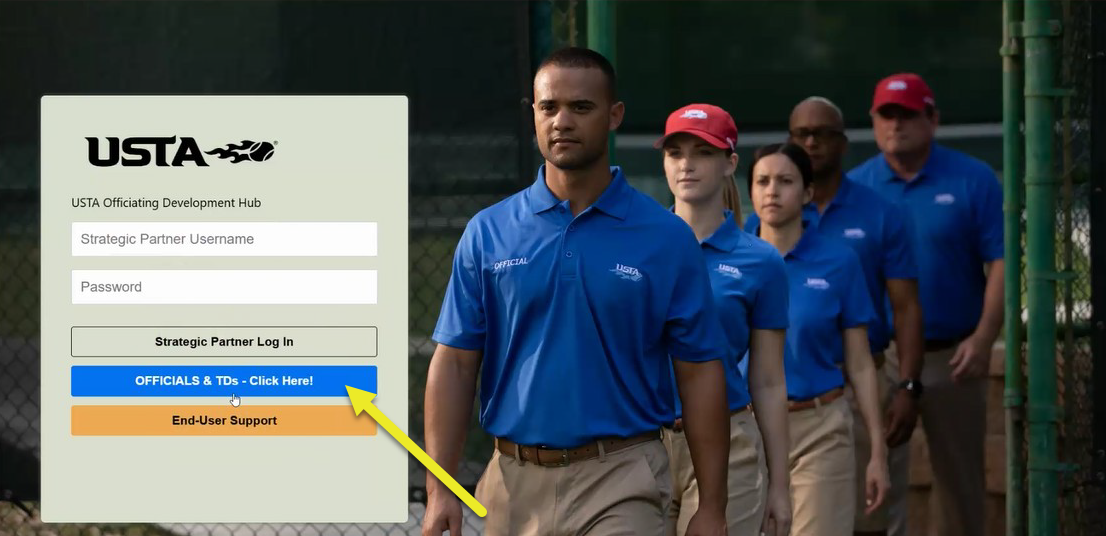
3. On the next page, enter your USTA.com account credentials and click 'Sign In'. You should be automatically logged into the USTA Officiating Development Hub.
If you do not have a USTA.com account yet, please contact the USTA Customer Care.
